

A plumbing company came to us mid rebuild with a problem nobody on the project had thought about. They had QR code stickers on trucks, invoices, and fridge magnets all over their service area, every one of them pointing at a URL the new site was about to delete. That sticker is the whole discipline of migration SEO in one object. The internet remembers your old URLs long after your new design forgets them, and it remembers them in places no crawl will ever find.
I have been migrating websites since 2009, the work behind our website migration service, including a 1,000 plus page migration for Trust Guss Injury Lawyers that kept every ranking URL, and here is the position this checklist is built on. Migrations do not fail because someone missed item 31 of 40. They fail because of two decisions made before any checklist gets opened, changing URLs that did not need to change, and throwing away content that was quietly earning. Get those two right and the rest of this list is hygiene. Get them wrong and no list saves you.
Table of Contents
Why migrations tank traffic
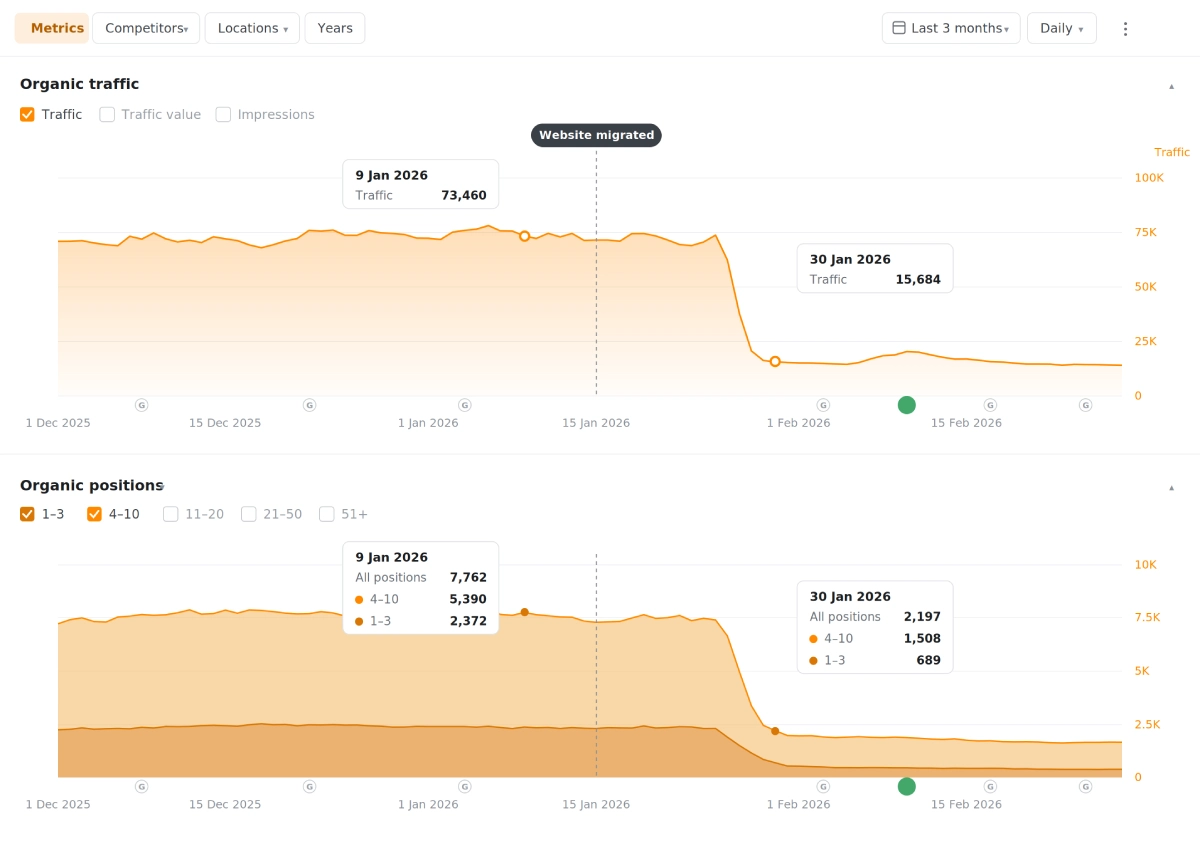
The largest group of clients we take on are businesses whose previous rebuild broke them. One owner told us traffic fell 70 percent the day the new site launched. Another watched a decade of content get discarded by a designer who saw old blog posts as clutter. The pattern under almost every story is the same, and it is worth naming plainly.
Google ranks URLs, not websites. When a page moves without a redirect, its rankings do not transfer to the new page, they die with the old one. When content gets deleted because it looked dated, every keyword it held goes with it. A redesign can change everything about how a site looks and works. It becomes dangerous only at the moment it changes where things live and what exists.
Know which kind of migration you are running
Migration is one word covering five different projects, and they do not carry the same risk. Most guides treat them as one job, which is how a low risk redesign ends up with a domain change bolted on because everything was moving anyway. Name your type before the checklist starts, and when a project stacks types, the risk multiplies rather than adds.
| Migration type | What changes | Risk to rankings |
|---|---|---|
| Design refresh | Templates and styling, same URLs and content | Low |
| Platform change | The CMS underneath, same domain | Moderate when the new platform lets you keep URLs, high when it forces its own |
| URL restructure | Where pages live | High, every moved URL is a bet |
| Domain change | The address of everything | Highest, even done right it carries uncertainty |
| Brand/Website consolidation | Several sites merging into one | Highest, plus heavy redirect volume |
The checklist below assumes the hard case, a rebuild that changes platform and touches URLs, because covering that covers the rest.
Before you touch anything, crawl the site
Every migration we run starts with a full crawl in Screaming Frog and ends up in one spreadsheet, and this sheet is the single item on this checklist that most guides skip. It lists every URL the site has, what it does, and what will happen to it. Here is what five rows of ours look like.
| URL | Status | Page type | Target keyword | Decision |
|---|---|---|---|---|
| /services/drain-cleaning/ | 200 | Service | drain cleaning tampa | Keep, URL unchanged |
| /blog/water-heater-cost-2019/ | 200 | Blog | water heater cost | Update in place, keep URL |
| /special-offer-spring/ | 200 | Landing | none | Kill, 301 to /coupons/ |
| /about-us.html | 301 chain | Company | none | Fix chain, point direct |
| /plumber.php?id=14 | 200 | Service | emergency plumber | Keep content, 301 to /emergency-plumber/ |
Do not stop at your own sitemap. Pull the pages Google Search Console says get impressions, the pages Ahrefs says have backlinks, and the top landing pages in your analytics, because URLs missing from your sitemap can still be earning. Check the Wayback Machine if a past rebuild already lost pages, since content that ranked once can be rebuilt and often recovers. And walk the building. The QR sticker, the printed brochure, and the radio spot vanity URL live outside every crawl.
The website migration SEO checklist
The full list, in the order we run it. Each phase gates the next.
Before the build starts
- Crawl the entire site and build the architecture sheet with a keep, update, kill, or redirect decision on every row.
- Pull ranking URLs from Search Console, linked URLs from Ahrefs, and top landing pages from analytics, and add anything the crawl missed.
- Assign one target keyword per page that survives, so the new site is built around what each page must defend.
- Benchmark everything. Export current rankings, traffic by page, and conversion numbers, because in three months this baseline settles every argument.
- Decide the URL structure once, in writing, with dashes instead of underscores and one canonical version of the domain, www or not, wherever the links already point.
- Pick a launch window in your slow season, because a wobble you can afford in February can cost real money in July, and moving the start date is cheaper than compressing the build.
During the build
- Build the new site behind a login or on a dev domain that is noindexed, and check the noindex is there, since we have found staging sites ranking against their own live sites.
- Map every old URL to its new home in the sheet, one to one, before any redirect gets written.
- Carry over title tags, meta descriptions, and heading structure for every page that keeps its keyword, then improve them, never blank them.
- Move the content before the design gets finalized, because layouts built around real content do not need the content trimmed to fit them later.
- Rebuild internal links to point at final URLs directly, not through redirects.
- Carry over schema markup with the templates, since structured data lost in a rebuild takes review stars and rich results with it.
- Keep image file paths where you can and redirect the media library where the platform forces a change, because image search traffic dies quietly in migrations and nobody notices for months.
Launch week
- Load every 301 redirect and test the top 100 URLs by traffic by hand, plus every URL with a backlink.
- Remove the noindex from the new site and confirm it, because the single most common self inflicted wound in migrations is launching with the staging noindex still on.
- Submit the new XML sitemap in Search Console and keep the old sitemap available so Google can process the moves faster.
- Crawl the live site the same day and fix every 404 and redirect chain the crawl finds.
- Verify analytics and conversion tracking fire on the new pages, since a migration that breaks tracking looks like a traffic disaster even when it is not.
- Read the canonical tags on the live pages, because a canonical still pointing at the staging domain tells Google the real site is the copy. We once found a canonical hiding a company’s entire American storefront, and it was one line of code.
- Update the destination URLs in your ad campaigns, email templates, and social profiles, so paid traffic stops paying the redirect tax on day one.
The 30 days after
- Watch the Pages report in Search Console for a rising Not Found count, and fix new 404s the week they appear.
- Recrawl weekly and compare against the architecture sheet until the two match.
- Compare rankings and traffic against your baseline by page, not sitewide, because sitewide numbers hide a section that broke.
- Leave the redirects in place permanently. Redirects cost nothing to keep and rankings to remove.
- Keep the old hosting alive for at least 30 days, because the fastest fix for a missed file or a broken redirect is a server that still remembers everything.
Every project we run keeps a 30 day support window after launch on the shared project chart for exactly this phase, because the migration is not done at launch, it is done when the baseline numbers come back.
One aside on blogs, because they are where migrations go to die quietly. A site with 500 old posts usually has layouts and inline styles from three previous designs baked into the post HTML, and migrating that by hand is the step teams skip. We wrote a small tool that strips legacy markup in bulk and restyles posts to the new design, and the honest lesson in it is that whatever your method, the blog needs its own migration plan, not a paste job in the last week.
The redirect rules we never break
The first rule of redirects is to need as few of them as possible. We keep URLs exactly where they are for this reason, because every redirect is a small bet that Google processes the move cleanly, and the best migration is the one that barely needs any. When there is no option and pages have to move, a 301 passes the page’s authority to its new URL, and the rules below exist because partial or sloppy redirects are the top cause of post launch drops.
Redirect one to one. The old drain cleaning page goes to the new drain cleaning page, not to the homepage, because a redirect to an irrelevant page gets treated like no redirect at all. Kill chains, meaning the old URL points directly at the final destination, not through two hops of past migrations. And sort the pages you are killing into two piles. A killed page with backlinks, rankings, or real traffic gets a 301 to the closest surviving relative, because it has something worth passing. A loser page with no value, no rankings, and no links gets a 410, which tells Google the page is gone on purpose, and that is cleaner than a lazy 301, since Google does not always honor a redirect that lands somewhere unrelated and quietly treats it as a 404 anyway.
On the question everyone asks, I will be straight about where I have landed and where I have not. I cannot promise a migration with zero movement, because Google recrawls and reevaluates and some queries wobble for a few weeks even when everything is done right. What I can promise is the thing I tell every client in the first call, which is that I will not change your URLs, and on the migrations where we held that line, including the 1,000 plus page Trust Guss project, the wobble stayed a wobble instead of becoming a drop. How long to keep redirects is the one I have gone back and forth on, since Google’s own site move documentation says a year or so is enough. We keep them forever anyway. Storage is free and rankings are not.
What should not change in a website migration
URLs that rank stay where they are. This is the least popular sentence in our sales calls, because new platforms and new information architectures tempt everyone to tidy the URLs, and tidying is exactly the change that costs you. Hierarchy can live in breadcrumbs and internal links instead of the URL path, so you can reorganize a site without moving what Google already trusts.
Content that earns stays too, whatever it looks like. Before deleting any old page, look up what it ranks for and what links to it. A dated post holding position four is an asset wearing ugly clothes, and the fix is a redesign of the page, not a funeral. The clients who came to us after losing a decade of content did not lose it to a hacker. They lost it to a checkbox in a migration plugin and a designer’s taste.
The extra work a domain change adds
A domain change takes everything above and adds a layer people forget. Google Search Console has a Change of Address tool, and it only runs once both domains are verified, so verify the new domain before launch day, not during it. Your Google Business Profile, directory citations, and social profiles all point at the old domain, and for a local business those citations are ranking signals, so updating them is SEO work, not admin. Sort out the old domain’s email records before anything else moves, because the fastest way to turn a migration into a crisis is an owner who stops receiving email mid project.
And keep paying for the old domain forever. The 301s only work while you own it, and dropped domains get bought by people who know exactly what your old links are worth.
How to tell a normal wobble from a real problem
Every migration moves some numbers for a few weeks, and knowing what normal looks like keeps you from panicking into bad decisions. Normal looks like this. Positions flutter a spot or two on some queries, impressions sag a little and recover, and the graph turns noisy while the trend holds. Google is recrawling and reevaluating, and patience is the correct response. Here is that same story drawn out, so you know it when your own dashboard shows it.
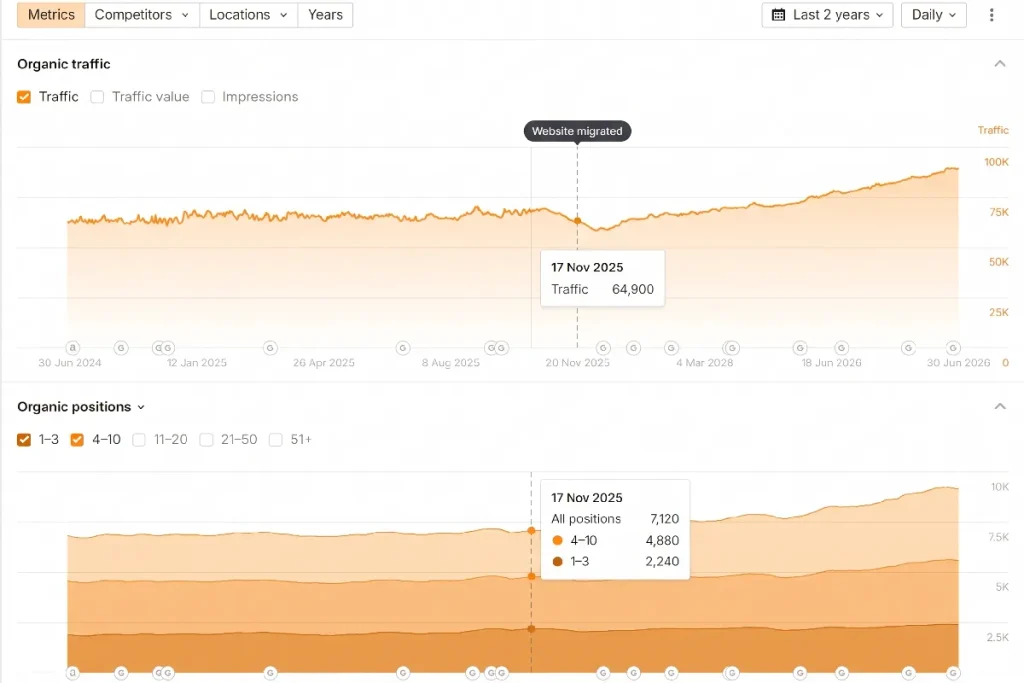
A real problem shows up in specific places before it shows up in revenue. The Not Found count in Search Console climbs week over week instead of shrinking. One section of the site loses its traffic while the rest holds, which usually means a redirect pattern failed for that one folder. The indexed page count falls past week three and keeps falling. Impressions drop off a cliff instead of sagging, which points at a noindex, a canonical, or a robots.txt problem rather than at rankings.
Diagnose smallest to biggest. Check one broken page’s redirect by hand, then its section, then the sitewide crawl against the architecture sheet. The disaster is almost never 400 separate problems. It is one pattern repeated 400 times, and a pattern gets fixed in an afternoon once someone sits down and looks at it.
Who should not migrate at all
Some sites should not be migrated, and it costs us money to say so.
A site with performance problems needs a technical audit first, not a rebuild. Fix the technical errors, remove or rewrite the content weighing the site down, and get it performing. Half the time that solves the problem that started the migration conversation.
A site with solid rankings and a dated look usually needs a facelift, a website redesign in skin only, new design on the existing pages in weeks instead of a rebuild over months. No URLs move, and the cost depends on the size of the site, so we quote it after the crawl. And a site changing domains purely for branding should ask hard if the brand gain covers the risk, because even a perfect domain change carries real uncertainty.
FAQs
Not if URLs stay the same, and usually only briefly if they must change and every page gets a one to one 301. Expect a few weeks of movement on some queries while Google recrawls. The migrations that lose rankings for good are the ones that change URLs without redirects or delete content that was ranking.
Google has said about a year is enough for it to process a move. We leave them permanently, because old URLs live on in bookmarks, printed materials, and links you will never find, and removing a redirect can only cost you.
The SEO work runs alongside the build. The crawl and architecture sheet take the first week or two, the mapping happens during the build, and launch week plus 30 days of monitoring close it out. On our projects a standard rebuild runs three to four months end to end, with the migration steps embedded in that schedule rather than added to it.
Yes, if they have backlinks, traffic, or rankings. Point each one at the closest surviving page. A deleted page with links pointing at it is authority you paid for evaporating through a 404.